


Grisoll WiFi Gateway
Grisoll WiFi Gateway
Instantly grant or revoke access permissions from anywhere in the world.
Fits: Works with all Grisoll Bluetooth smart locks · needs 2.4GHz WiFi. Check your door
No se pudo cargar la disponibilidad de retiro
Control your Grisoll smart lock from anywhere. The Grisoll WiFi Gateway connects your Bluetooth lock to your home WiFi, so you can lock, unlock and check your door from your phone, whether you're at work, on holiday or letting in a guest. Plug it in and pair it in under two minutes.
Key features
- Remote control: lock and unlock, create or delete passcodes and share access from anywhere with the free TTLock app.
- Real-time updates: see door status, battery level and a time-stamped log of every entry.
- Voice control: works with Amazon Alexa and Google Home.
- One gateway, several locks: connect multiple Grisoll smart locks on the same network.
- Simple set-up: no tools, no electrician and no technical know-how needed.
Specifications
- Dimensions: 70 × 70 × 26mm
- WiFi: 2.4GHz only (5GHz-only networks are not supported)
- Bluetooth: 4.0
- Range to lock: up to 10m
- Power: USB-C
- Encryption: AES 128-bit
- App: TTLock (iOS and Android)
- LED status: flashing red/blue = ready to pair; solid blue = connected; red = network error
Set-up in three steps
- Plug the gateway into a USB power source within 10m of your lock.
- In the TTLock app, open the menu, choose Gateway and add a device.
- Connect to your 2.4GHz WiFi network and pair it with your lock.
The gateway needs to stay plugged in for remote access to work. For the most stable connection, place it close to both your lock and your router.
In the box
- Grisoll WiFi Gateway
- USB-C power cable
- Quick set-up guide
Technical Specifications
Technical Specifications
Dimensions: 70 × 70 × 26mm
Wireless network: WiFi 2.4GHz
Bluetooth: Bluetooth 4.0
Maximum range: Up to 10m between gateway and lock
Power: USB-C
Encryption: AES 128-bit
Lock capacity: Supports multiple smart locks
App: TTLock (iOS and Android)
Voice assistants: Amazon Alexa and Google Home
LED indicators: Flashing red/blue = ready to pair; solid blue = connected; red = network failure
Delivery & Returns
Delivery & Returns
Tracked delivery:
Most orders ship within 1–2 business days and typically arrive within 7–9 days, with tracking. Delivery options for your country, and any taxes or import charges, are shown at checkout.
30-day returns:
If your lock isn't right for you, contact us within 30 days of delivery to arrange a return. See our Refund Policy for details.
Not sure it fits?
Email a photo of your door and your measurements to info@grisoll.com before you order and we'll confirm the right model.


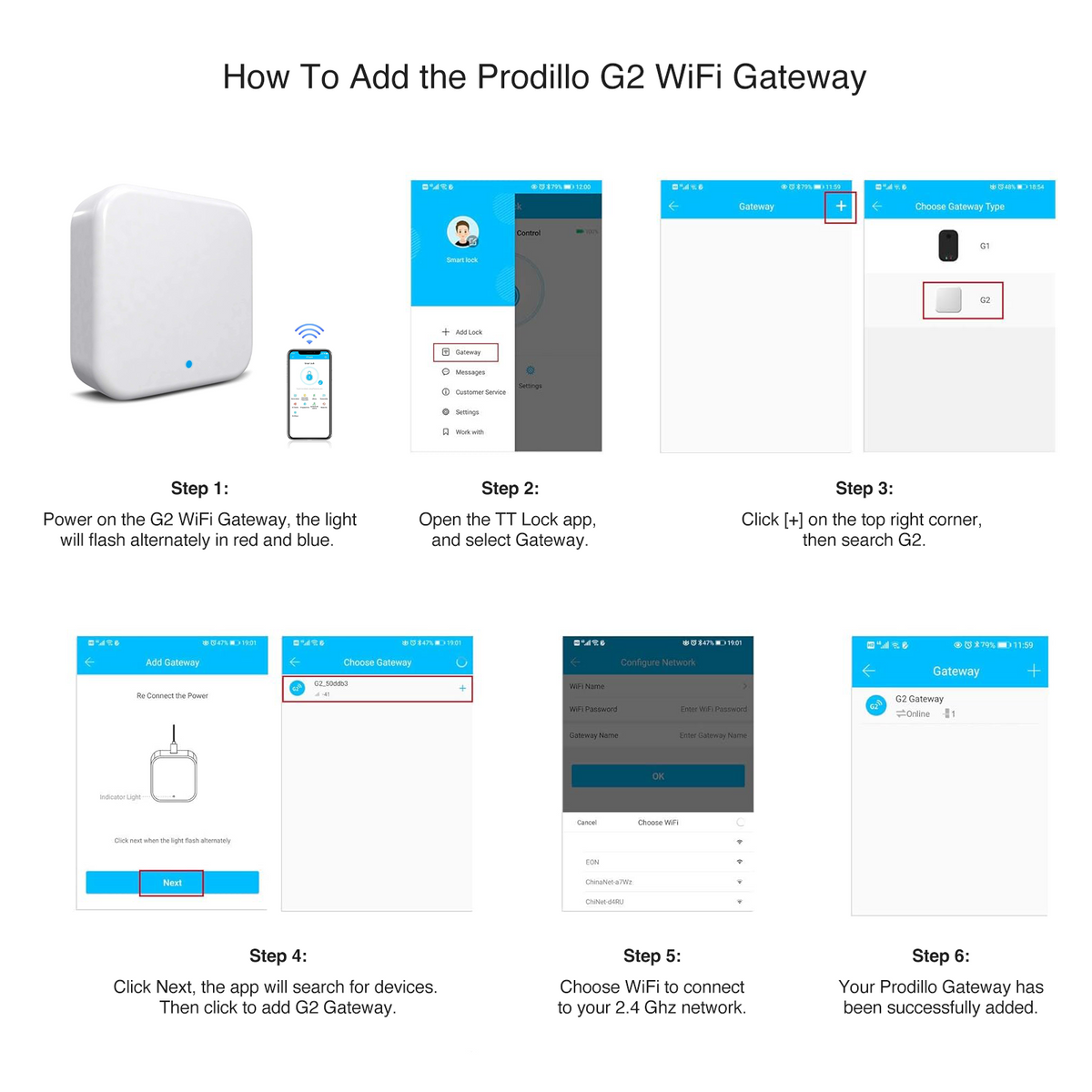

Easy 3-Step Setup
1. Plug the gateway into a USB power source within 10m of your smart lock.
2. Open the TTLock app, tap the menu (≡), select Gateway, then tap + to add a new device.
3. Connect to your 2.4GHz WiFi network and pair with your lock. It takes under 2 minutes.
Note: the Grisoll WiFi Gateway needs a 2.4GHz WiFi network (5GHz-only networks aren't supported). Keep it plugged in to use remote access.
Let customers speak for us
This was a straightforward swap for our uPVC door without needing a locksmith. The 40mm size matched perfectly, the reversible latch made the left-swing setup easy, and everything feels durable.

Haven't had a single connectivity issue in eight months of daily use.

The backup key slot is a nice safety feature that shows thoughtful design.

Heavy-duty construction feels like it'll last decades, not just years.

Finally a security upgrade that's both practical and genuinely convenient.
My realtor says it's a major selling point for potential buyers.
Shared temporary access codes with my cleaning service and everything worked flawlessly.
Customer support responded immediately when I had a question.
No more fumbling with keys in the dark - absolutely worth it.
Very reliable, though installation took a bit longer than I'd hoped.
No more anxiety about whether I locked the door - I can verify from anywhere.
This made upgrading our back door to a smart lock effortless. The internal mechanism aligned perfectly, no drilling or adjustments needed, and the door operates smoothly now.
Frequently Asked Questions
What does the Grisoll WiFi Gateway do?
It connects your Bluetooth smart lock to your home WiFi, so you can control it through the TTLock app from anywhere. Without it, the app works over Bluetooth, so you need to be near the door.
How hard is it to set up?
Set-up takes under 2 minutes: plug it in, open the TTLock app, add the gateway and connect it to your 2.4GHz WiFi. Your phone and the gateway need to be on the same WiFi network while you pair them.
Can I control several locks with one gateway?
Yes. One gateway can support several Grisoll smart locks in the TTLock app, which is ideal for homes with more than one entrance or properties with several units.
Where should I put the gateway?
Within 10m of your smart lock, and within range of your WiFi router. The closer it is to both, the more stable the connection.